Cart
Your shopping cart is empty!
It's never too late to make things right :)




The main selling point of the new controller is that it is a more affordable all-in-one solution than the extremely expensive DJI Smart Controller and its successor, the equally expensive DJI RC Pro . A year later, an updated version of DJI RC appeared - DJI RC2 , which so far only works with DJI Air 3 .

In this article, we'll take a closer look at the DJI RC2 , focusing on:
Additionally, we'll discuss whether it's worth upgrading to the recently released DJI RC-N2 .
One can take one look at the DJI RC2 and immediately know that it will be a useful accessory for the Air 3 and the subsequent quadcopters that will be released after it.
The first thing you'll notice about the RC2 is its built-in 5.5-inch Android-based screen. This screen is the same size as the now discontinued DJI Smart Controller and the current DJI RC PRO. Combined with this screen size and constant 700 nit brightness, the DJI RC2 becomes a cost-effective and reliable all-in-one dedicated device.
Since the screen is built into the RC2, there is no longer a need to connect a smartphone or device to the controller to control it. The DJI Fly app is already loaded on the remote control, all you have to do is activate it and use it. Because you don't need a cell phone to fly, getting Air 3 up and flying takes a little less time than taking out your cell phone, connecting cables, turning on the remote, and opening the DJI Fly app. With DJI RC2 it's simple - power up your Air 3 and RC2 and you're ready to fly. Since DJI RC is a standalone remote control for Air 3, no cables are required. Connection cables are an additional source of problems in photography and video equipment, as they sometimes break, get lost or are forgotten, causing the session to stop. Not having to deal with cables reduces potential problems during flight.
The biggest advantage that many will appreciate is that the RC2 is much cheaper than the DJI RC Pro. No, the RC Pro doesn't work with the Air 3 at this time, but it's great to see a universal solution that costs less than $1,000. The DJI RC2 currently retails for $369 on the DJI website. Unfortunately, it seems to sell out quite often. If you have an Air 3 and really want a DJI RC2, GoProkat.ua has official DJI devices.
DJI RC2 is a quality remote control. Using slightly darker gray plastic than the DJI RC, the RC2 looks more professional. When the RC2 remote control is in your hands, it does not bend or creak at all, which also indicates the reliability of the design. One of the most important aspects of a remote control, besides how well it does its job, is how good it feels to use. DJI has put a lot of thought into the ergonomics of all of its controllers, and the DJI RC2 is no exception. Although the RC2 is a simple rectangle, it has textured and slightly grippy sides that fit perfectly into your hand when holding the remote, making its ergonomics just perfect. All buttons and scroll wheels are within reach and feel equally good. Speaking of scroll wheels, they are no longer aluminum like those on the DJI RC . They're replaced with knurled, hard black plastic that actually has more grip than the old metal wheels.
The DJI RC2 weighs 420g, slightly more than the original DJI RC's 390g. Compared to the larger and more expensive DJI RC Pro , the RC2 is 240g lighter. When packing gear into a quadcopter backpack or photography bag, every gram counts. Fortunately, the RC2 is quite lightweight and doesn't have a significant impact on the weight of the equipment. We flew quadcopters with massive controllers that weighed kilograms, not grams. Therefore, the weight of the DJI RC2 is quite pleasant. The RC2 is slightly larger than the RC-N2 , a standard Air 3 controller without a built-in screen. Even though it is larger, as mentioned in the Design section, its shape and size are quite ergonomic. When it comes to quadcopter remote controls, there aren't many shape options: square, larger square, and rectangle.
One of the really valuable aspects of the DJI RC2 all-in-one is the large built-in screen. The 5.5-inch screen is slightly smaller than the standard iPhone screen and has a higher constant brightness. The 5.5-inch screen has a constant brightness of 700 nits. The DJI RC Pro's brightness is a whopping 1,000 nits, but the RC2's display is quite bright for shooting on very bright days. Using a matte screen protector will make your viewing experience even better. Although many cell phone companies emphasize how bright their screens are (1000 nits/1500 nits), many, if not most, of these cell phones begin to dim to the point of becoming unusable (in some cases) after a short period of time in summer conditions. I regularly shoot in bright sunlight with both the DJI RC and RC2 and have never had an issue with screen brightness. Plus, the RC2's screen never dims, no matter how hot it is outside. When shooting in extreme heat, the screen remains at full brightness. Apart from the brightness of the screen, the display has an FHD resolution and the images delivered to it are not only sharp but also smooth, with a crisp 1080p resolution at 60 frames per second.
In the screen section, it is worth mentioning that, as many know, the DJI RC2 uses a pre-installed version of the DJI Fly app. Since the DJI RC2 is built on Android and is essentially a smart Android device, using DJI Fly on it is similar to the user experience using DJI Fly on any Android phone. Since the RC2 is designed for DJI Fly only, it runs smoothly with no signs of lag or stuttering. Additionally, as with any Android device, you can access Wi-Fi and update the remote control's (and Air 3's) firmware as usual.
DJI RC2 (and RC-N2 ) is currently only compatible with DJI Air 3 . This is due to the new O4 transmission system (OcuSync 4.0), which we will talk about shortly. It is not yet known whether DJI plans to make DJI RC2 backwards compatible with drones that DJI RC works with, namely:
Likewise, we have yet to find out if DJI plans to make the Air 3 and future quadcopters compatible with the DJI RC and DJI RC Pro . Time will tell what's in store for the DJI RC2 , however, as of this writing, the DJI RC2 is only compatible with drones using the O4 transmission system (i.e. Air 3).
OcuSync 4.0 is the latest video transmission system developed by DJI, and OcuSync 3.0 is used in the Mavic 3 , Air 2S and Mini 3 series models. In the OcuSync 4.0 system used in the DJI RC2 , the antenna system consists of two transmitters and four receivers. This new system, although mostly invisible, features two new "rabbit ear" antennas that fold and unfold for maximum signal coverage. However, antennas are not for appearance. The new image transmission system streams HD video at 60 frames per second, much more powerful than before, and requires more antennas to do so.
OcuSync 4.0 can transmit video over a maximum distance of 20 km. The transmission signal is supported in the 2.4 GHz, 5.1 GHz and 5.8 GHz frequency bands, which provides the DJI RC2 with stronger anti-interference capabilities. What does all of this mean? While we never advocate beyond visual line of sight (BVLOS) flying, it does mean being able to fly with a much stronger signal that is less susceptible to interference from external sources. The strong signal is ideal for flying in urban areas or in areas with strong interference, such as city centers or large populated areas.
Storage Capabilities
Unlike standard controllers without a built-in screen, the DJI RC2 has both internal memory and an SD memory card slot. The DJI RC2 has a built-in memory of 32 GB, and you can use an SD card up to 256 GB for data storage. There are two reasons for different data storage options.
Firstly, the internal memory stores DJI files - the files that launch the remote control and are necessary for DJI Fly to work, namely 11 GB. 21 GB remains for user content. Secondly, both internal storage and SD card can be used to store screenshots and screen recording. The ability to store screenshots and record screens is very convenient for content creators who use this content to create drone tutorials. As a bonus for those who don't need to use the SD card slot to store content, it can be used as a slot to store an additional SD card for the Air 3 .
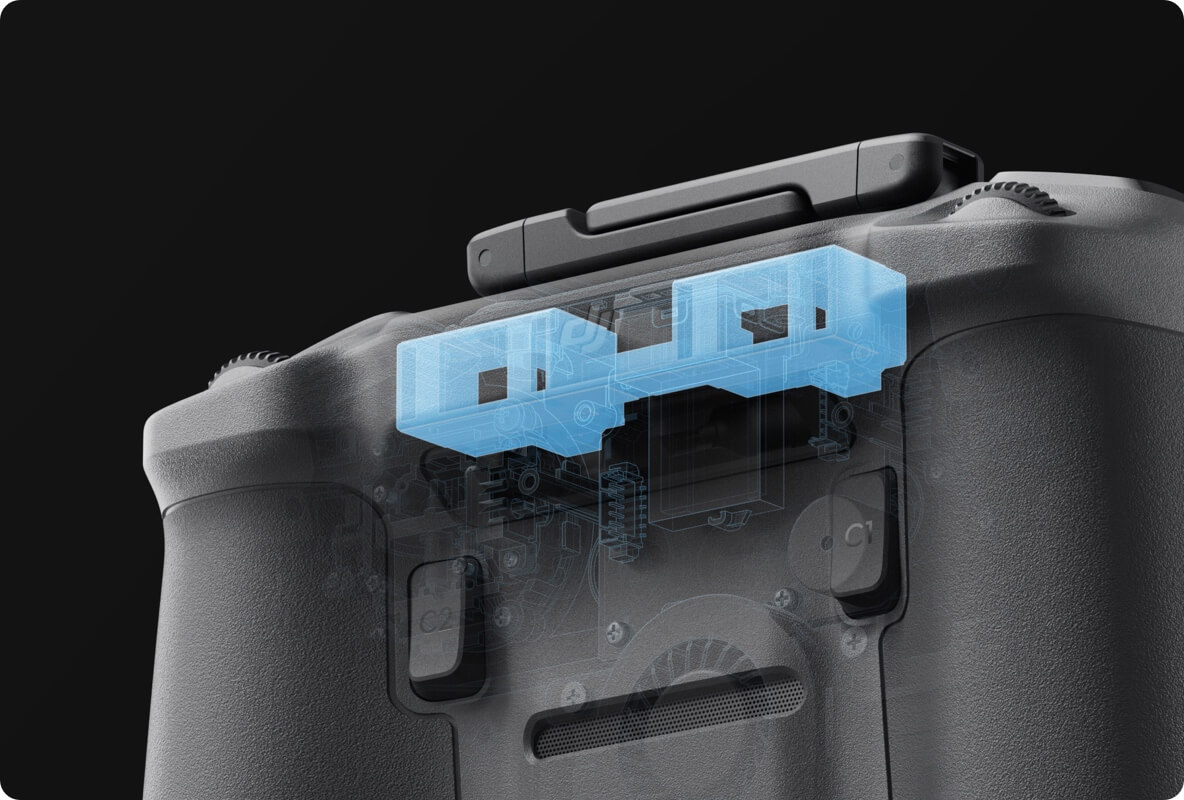
According to DJI, the DJI RC2 is equipped with two 3100 mAh batteries. This allows the DJI RC2 to operate for about 3 hours at maximum brightness. It takes 1.5 hours to charge the internal battery/batteries using a 9V fast charger. Like the rest of the Air 3's charging ports, the remote also uses a standard USB-C connector, making charging the RC more convenient.
Charging the DJI RC2 is as follows:
Press and hold the Power button on Air 3 for about 4 seconds. The DJI Air 3 will beep to indicate that it is in pairing mode. Click the Pair button at the bottom of the DJI RC2 screen. It will beep loudly to indicate pairing is in progress. After about 10 seconds, the Air 3 should pair with the new DJI RC2 .
Despite the simplistic design of the DJI RC2 , it has a full range of features worth considering. We'll look at all the buttons, switches, and dials on the remote control and the functions they perform.
Return Home (RTH) Button
When pressed and held, Air 3 will automatically return to the location marked as home in the DJI Fly app. RTH options can be configured.
Cine, Normal and Sport mode switch
Power button (press then long press to turn on) 4 status LEDs and power on LED.
2 removable control joysticks and joystick holder.
Buttons C1 and C2. Can be configured as follows:
Button C1
Button C2
2 slots for storing removable control joysticks.
2 recessed mounting holes.
Ventilation grille.
Top of DJI RC2
2 scroll wheels/discs
Left wheel - adjustable suspension up/down.
The right wheel can be configured as follows:
Video recording button.
Shutter button for photos.
2 internal/built-in antennas.
2 adjustable antennas.
Button/Dial Combinations
In addition, there are modifiers or combinations of buttons and dials that also perform specific functions and can be changed.
C1 button + right dial
C2 button + right dial
Bottom of DJI RC2
SD card slot
Supports SD cards up to 256 GB.
USB-C port.
Mounting holes - for attaching straps.
On the one hand, DJI RC2 is better than DJI RC . This is because it uses the more powerful OcuSync 4.0 video transmission system and is compatible with DJI Air 3 . At the moment, other than RC-N2 , no other controllers work with it. But on the other hand, the DJI RC2 is no better than the DJI RC in that, at the time of writing, it can only control the DJI Air 3 , while the DJI RC is capable of controlling:
Also, because the physical dimensions of the DJI RC2 have changed (with the addition of external antennas), accessories such as the DJI RC Controller sunshade will not fit. If you have a DJI RC with a sunshade, then you will have to buy another one specifically for the DJI RC2 .
Unfortunately, the answer is no. Like the DJI RC , the DJI RC2 cannot install or download any apps. It comes with DJI Fly pre-installed and that's about it. Perhaps in the future DJI will add the ability to install other applications on the DJI RC2 .
As of this writing, the DJI RC2 cannot live stream as it does not have access to YouTube or other streaming apps. Currently, the only way to live stream with the Air 3 is with the DJI RC-N2 .
Even though the DJI RC2 was released just two months ago in July 2023, there are already quite a few accessories available for the DJI RC2 .
Even though the RC2 operates at 700 nits of brightness continuously, the screen can still produce a lot of glare in direct sunlight if you don't use a matte screen protector. The RC Sun Covers are not only adjustable, but also allow you to store the RC2 with the control sticks installed.
For improved visibility in direct sunlight, matte anti-glare screen protectors do an excellent job of reducing glare while also providing added protection for the built-in 5.5-inch screen. If you already have this kit for DJI RC , it will work for DJI RC2 as well since the screen sizes are the same.
Using a strap is very helpful during long flights, making it easier to hold the remote control, and during breaks between flights you do not need to look for where to put the remote control.
Create your own strap customization
For those who want a more convenient solution, albeit a more expensive one, the Peak Design Lanyard Screw and Camera Strap combo can be used. This combination is convenient, reliable and can be interchanged between DJI RC and DJI RC2 using anchor connectors.
While the RC2 is a great investment, there are two glaring downsides to the DJI RC2 .
The first downside is that the DJI RC2 doesn't allow you to install third party apps, which means if you want to request LAANC authorization, check the weather, launch Litchi (if/when Air 3 is supported), or check any other quadcopter related information apps . You will need an additional device, such as a smartphone.
The second downside is that the DJI RC2 doesn't allow live streaming via apps like YouTube. Currently the only way to live stream is to use the standard DJI RC-N2 , as stated in the FAQ.
While there are downsides here and there, such as no live streaming or running third-party apps, the DJI RC2 is definitely worth it (if you don't need those options). Considering the price of the DJI RC2 , whether included with the DJI RC2 Fly More Combo or purchased separately, having a dedicated controller with a fairly bright built-in screen is worth it. Likewise, when you consider the fact that this type of setup is convenient, fast, and space-saving, you can see that purchasing a DJI RC2 will also make flying a lot easier and even more fun.
